AI is all over the internet now. Some people are sick of “AI slop,” some are actively trying to exploit the hype, and others are just trying to get used to the new status quo. They are looking for meaningful ways to pragmatically integrate these tools into their daily workflows without descending into the pits of existentialism.
Let’s talk about that latter category — about the reality of production that many studios have already gotten used to.
If you work in game development, you know that for every hero asset that requires pure creative genius, there are a dozen “grunt work” tasks: creating texture variations, iterating on generic loot icons, or creating the fiftieth variation of a background tree that the player will barely glance at.
This is where the AI art pipeline is actually useful. It allows building a production accelerator that lets artists focus on the stuff that actually matters. Let’s take a look under the hood at how modern production pipelines are actually using these tools to cut costs, speed up iteration, and keep both shareholders and artists (kinda) happy.
Note: AI-assisted art production is a separate service. It requires a different mindset and workflow, and is always discussed with the client beforehand.
The accelerator, not the artist
To understand how an effective AI art process works, you first have to define what the tool is actually for. If you treat AI as a “Make Art” button, you are going to lose. You will end up with broken, legally ambiguous, and generic assets that players can spot from a mile away. That is what happens when you remove the human from the loop.
Successful studios treat AI strictly as a support tool. Think of it like the transition from painting on a physical canvas to using Photoshop layers. When digital painting arrived, it didn’t kill art; it just removed the need to wait for paint to dry and allowed for “Undo.” Similarly, AI tools are integrated to support skilled artists.
How the AI art pipeline works in practice
So, what does this actually look like on a Tuesday morning in the studio? It isn’t just typing prompts into a Discord channel (hello 2022 Midjourney). It is a structured workflow. Here is what that AI art process looks like in practice when creating a standard asset — a 2D character or illustration, for example:
1. The brief & foundation
Everything starts exactly where it always has: with a detailed brief. Whether it’s a character portrait, a UI element, or an environment piece, we need to establish the archetypes, the mood, and the narrative context.
You cannot effectively prompt without a clear artistic vision. AI is technically impressive, but it is contextually stupid. It doesn’t know that your character needs to look “battle-weary but hopeful” or that the red scarf signifies a specific faction in your game’s lore. An Art Director does.
At this stage, artists might create manual mood boards or rough sketches to establish the “soul” of the asset. We need to know what we are making before we ask the software to help us make it.
2. The “Sandwich” method
This is the core of the AI art pipeline. This is where the workflow diverges from the traditional path. Instead of spending hours rendering a concept from scratch, the pipeline uses a “Human-AI-Human” sandwich method.
This approach ensures the human artist maintains control over the composition and intent, while the AI handles the heavy lifting of rendering textures and lighting.
- The Blockout: An artist sketches a rough composition or “photobashes” images together to establish the layout and color. This is critical. If you just prompt “castle on a hill,” the AI will give you a random castle. If you sketch a specific silhouette of a castle with a specific lighting angle, you are forcing the AI to follow your lead.
- The Generation: This rough input is fed into an image generator (we often use a custom-trained Stable Diffusion model) using “Image-to-Image” techniques. We aren’t asking it to invent an image; we are asking it to “reskin” our blockout. It rapidly produces variations in texture, lighting, and detail based on the artist’s sketch.
- The Refine Loop: The artist takes the best parts of those outputs — maybe a specific landscape texture or a character’s silhouette — and paints over them. This cycle of generate, paint, and regenerate repeats until the concept is solid.
3. Style consistency
One of the biggest challenges in 2D art, especially when outsourcing or scaling up a team, is making sure 10 different artists sound like one “voice.”
In a traditional workflow, the Art Director spends half their life correcting brush strokes to ensure the UI icon looks like it belongs in the same universe as the character portraits. In an AI art pipeline, consistency is eased by training models on the project’s specific art style.
By training AI on the studio’s existing assets, we ensure that the “raw material” everyone works with shares the same visual DNA. It acts as an automated style guide. When an artist generates a base for a sword, it already has the correct level of grit, saturation, and line weight associated with the game.
4. Better reviews
This is a massive quality-of-life improvement for the business side of things.
In a traditional pipeline, early reviews often rely on rough line art or grayscale sketches. This requires stakeholders — producers, marketing teams, or clients — to use their imagination. “Trust me,” the artist says, “it will look cool when it’s colored.” Often, the client nods, but then panics three weeks later when they see the color and realize it wasn’t what they imagined.
AI acceleration changes this dynamic completely.
Because the rendering phase is so much faster, the team can present fully lit and colored concepts during the very first review. This shifts the feedback loop away from “fix this sketch” to high-level design decisions. Stakeholders can visualize the final look immediately, leading to faster approvals and fewer heart-stopping changes late in production.
5. Manual polish
Once a concept is approved, the AI tools are largely put away. The final mile is purely manual, and this is where the “Senior” in “Senior Artist” earns their paycheck.
AI is notorious for “hallucinations.” It might create a belt buckle that doesn’t actually close or a sword handle that merges into a hand.
Artists must overpaint the image to fix these errors, correct anatomy, polish materials, and ensure lighting consistency. They sharpen a character’s expression to match the narrative nuance that the AI missed. This final level of polish is what makes the difference between a professional game asset and “AI slop.”
6. Formatting
A pretty picture isn’t a game asset until it’s integrated. The final step involves preparing the 2D art for the game engine (Unity, Unreal, Godot, etc.).
AI cannot do this. It cannot understand the technical requirements of a sprite sheet. A human needs to separate elements into layers for parallax backgrounds, cut out transparent UI sprites, or organize character expressions into animation-ready files. While AI helps create the image, the technical structure required for the game is built by hand to ensure it functions perfectly in the build.
Where does AI actually fit?
We conducted deep research and hands-on testing to figure out where this tech actually saves money and where it’s just a shiny distraction. It turns out the efficiency isn’t uniform across the board.
High efficiency
There are specific areas where we have seen massive gains — sometimes reducing production time by up to 60%. (Keep in mind, that figure assumes the best possible variant with all stars aligned. Usually, it is closer to a 20-30% average saving, which is still significant).
- Item Skins & Icons: Once the style guide is set, generating variations of loot or equipment is incredibly fast. If you need 50 variations of a potion bottle, AI is your best friend.
- Landscape Generation: Getting the base lighting and composition for a background is near-instant. It allows the artist to skip the “blank canvas anxiety” and start painting over a solid base immediately.
- Human Portraits: For background NPCs or static dialogue heads, AI is an incredible base generator. It handles facial proportions and lighting very well, leaving the artist to tweak the expressions and styling.
Medium efficiency
- Environment Concept Art: It’s great for mood and color exploration, but it requires heavy photobashing to make sense spatially. AI doesn’t really understand 3D space, so it often creates MC Escher-style architecture that needs to be fixed by hand.
- Illustrations: useful for composition, but usually requires a total overpaint to fix structural weirdness. It serves as a great “inspiration board,” but rarely produces a final image.
Low efficiency
- Specific Narrative Actions: If you need a character doing something very specific, like “struggling to open a rusted pickle jar while looking hopeless,” AI will fail. It will give you a generic person holding a jar. A human artist needs to draw that nuance from scratch.
- Complex Mechanics: Anything involving precise mechanical parts (guns, vehicles, machinery) usually comes out looking melted or illogical.
- Precise Scenes: AI is all about “vibe.” It is terrible at precision. It struggles to keep a character looking exactly the same from different angles without heavy manual guidance. If you rely on AI for precision, you will spend more time fixing mistakes than you would have spent just drawing it by hand. Knowing when not to use the tool is just as important as knowing when to use it.
Limitations of the AI art process
We cannot discuss the AI art pipeline without addressing the elephant in the room: ethics, originality, and the “soul” of the art.
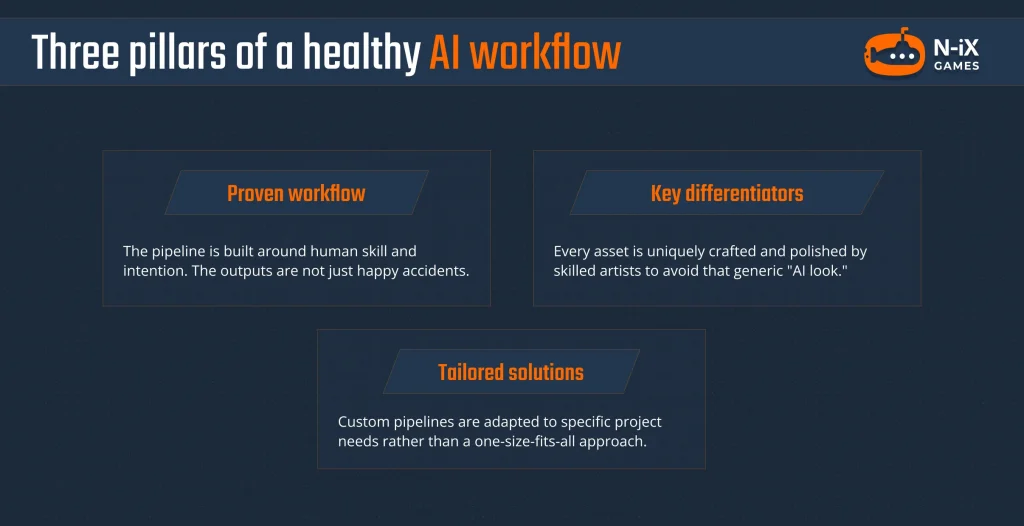
There is a valid concern in the industry about AI generating generic, “soulless” slop, or worse, infringing on copyright. These are not just Twitter arguments; they are real business risks. This is why our approach is strictly artist-driven content. We avoid generic AI-generated aesthetics by ensuring that every piece is uniquely handcrafted.
To use an AI art process effectively, you have to respect its limits and set ground rules.
Copyright & Ethics
Never use public artists’ names in prompts. It is legally risky and morally gray. It’s best to stick to internal libraries and ethical standards.
The most sustainable way to use these tools is to train them on your own art. If you have a library of assets from a previous game, train a model on that.
Conclusion: It’s about control
Ultimately, the integration of such an AI art pipeline works because it keeps the artist in the driver’s seat.
The technology is great, but it has no steering wheel. It always produces structural errors or logical inconsistencies because it doesn’t “know” anything. It doesn’t know that a belt buckle needs to actually function to hold pants up, or that a character’s scar has a tragic backstory.
By strategically integrating AI into the workflow, we aren’t looking for a “Make Art” button. We are looking for a way to maintain consistent quality across large teams, speed up the boring parts of ideation, and eliminate the “grunt work.”
When you strip away the hype and fear, AI is simply a tool. Like any tool, its value depends on the hands using it. If you’re looking to optimize your budget with pipelines proven in real production, the N-iX Games team is ready to help. Let’s discuss how our expert-driven AI production services can streamline your workflow without sacrificing quality.